PannerNode: orientationX property
Baseline
Widely available
This feature is well established and works across many devices and browser versions. It’s been available across browsers since April 2021.
Thuộc tính orientationX của giao diện PannerNode cho biết thành phần X (ngang) của hướng mà nguồn âm thanh đang hướng đến, trong không gian tọa độ Descartes 3D.
Vectơ đầy đủ được xác định bởi vị trí của nguồn âm thanh, được đưa ra dưới dạng
(positionX, positionY,
positionZ), và hướng
của nguồn âm thanh (tức là hướng mà nó đang đối mặt), được đưa ra dưới dạng
(orientationX,
orientationY,
orientationZ).
Tùy thuộc vào tính định hướng của âm thanh (được chỉ định bằng các thuộc tính
coneInnerAngle,
coneOuterAngle, và
coneOuterGain), hướng của
âm thanh có thể thay đổi âm lượng cảm nhận được khi nó đang phát. Nếu âm thanh
đang hướng về phía người nghe, nó sẽ to hơn so với khi âm thanh hướng ra xa
người nghe.
AudioParam chứa trong thuộc tính này là chỉ đọc; tuy nhiên bạn
vẫn có thể thay đổi giá trị của tham số bằng cách gán giá trị mới cho thuộc tính
AudioParam.value của nó.
Giá trị
Một AudioParam có value là thành phần X của
hướng mà nguồn âm thanh đang hướng đến, trong không gian tọa độ Descartes 3D.
Ví dụ
Trong ví dụ này, chúng ta sẽ minh họa cách thay đổi các tham số hướng của
PannerNode kết hợp với coneInnerAngle và
coneOuterAngle ảnh hưởng đến âm lượng. Để hình dung vectơ hướng ảnh hưởng như thế nào, chúng ta có thể sử dụng quy tắc bàn tay phải:
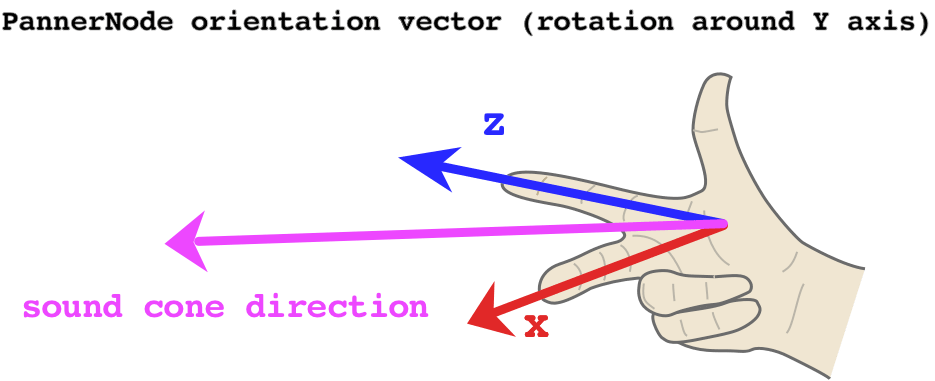
Đầu tiên, hãy bắt đầu bằng cách viết một hàm tiện ích để tính vectơ hướng.
Các thành phần X và Z luôn vuông góc nhau 90°, vì vậy chúng ta có thể
dùng các hàm sin và cos, được dịch chuyển cùng một lượng tính bằng radian.
Tuy nhiên, điều này thường có nghĩa là PannerNode hướng về
bên trái của người nghe ở góc xoay 0° - vì x = cos(0) = 1 và z = sin(0) = 0.
Sẽ hữu ích hơn nếu dịch chuyển góc đi -90°, điều này có nghĩa là PannerNode sẽ hướng thẳng về phía người nghe ở góc xoay 0°.
// this utility converts amount of rotation around the Y axis
// (i.e. rotation in the 'horizontal plane') to an orientation vector
const yRotationToVector = (degrees) => {
  // convert degrees to radians and offset the angle so 0 points towards the listener
  const radians = (degrees - 90) * (Math.PI / 180);
  // using cosine and sine here ensures the output values are always normalized
  // i.e. they range between -1 and 1
  const x = Math.cos(radians);
  const z = Math.sin(radians);

  // we hard-code the Y component to 0, as Y is the axis of rotation
  return [x, 0, z];
};
Bây giờ chúng ta có thể tạo AudioContext, một bộ dao động và
PannerNode:
const context = new AudioContext();

const osc = new OscillatorNode(context);
osc.type = "sawtooth";

const panner = new PannerNode(context);
panner.panningModel = "HRTF";
Tiếp theo, chúng ta thiết lập hình nón của âm thanh không gian hóa, xác định khu vực mà nó có thể được nghe thấy:
// this value determines the size of the area in which the sound volume is constant
// if coneInnerAngle === 30, it means that when the sound is rotated
// by at most 15 (30/2) degrees either direction, the volume won't change
panner.coneInnerAngle = 30;
// this value determines the size of the area in which the sound volume decreases gradually
// if coneOuterAngle === 45 and coneInnerAngle === 30, it means that when the sound is rotated
// by between 15 (30/2) and 22.5 (45/2) degrees either direction,
// the volume will decrease gradually
panner.coneOuterAngle = 45;
// this value determines the volume of the sound outside of both inner and outer cone
// setting it to 0 means there is no sound, so we can clearly hear when we leave the cone
// 0 is also the default
panner.coneOuterGain = 0;
// increase the Z position to ensure the cone has an effect
// (otherwise the sound is located at the same position as the listener)
panner.positionZ.setValueAtTime(1, context.currentTime);
Sau khi thiết lập PannerNode, chúng ta có thể lên lịch một số cập nhật cho
góc xoay trục Y của nó:
// calculate the vector for no rotation
// this means the sound will play at full volume
const [x1, y1, z1] = yRotationToVector(0);
// schedule the no-rotation vector immediately
panner.orientationX.setValueAtTime(x1, context.currentTime);
panner.orientationY.setValueAtTime(y1, context.currentTime);
panner.orientationZ.setValueAtTime(z1, context.currentTime);

// calculate the vector for -22.4 degrees
// since our coneOuterAngle is 45, this will just about make the sound audible
// if we set it to +/-22.5, the sound volume will be 0, as the threshold is exclusive
const [x2, y2, z2] = yRotationToVector(-22.4);
panner.orientationX.setValueAtTime(x2, context.currentTime + 2);
panner.orientationY.setValueAtTime(y2, context.currentTime + 2);
panner.orientationZ.setValueAtTime(z2, context.currentTime + 2);
Cuối cùng, hãy kết nối tất cả các nút và khởi động bộ dao động!
osc.connect(panner).connect(context.destination);

osc.start(0);
Thông số kỹ thuật
| Thông số kỹ thuật |
|---|
| Web Audio API # dom-pannernode-orientationx |