js13kGames: Cấu trúc progressive web app
Trong bài viết này, chúng ta sẽ phân tích ứng dụng js13kPWA, lý do nó được xây dựng theo cách đó và những lợi ích mà cách xây dựng ấy mang lại.
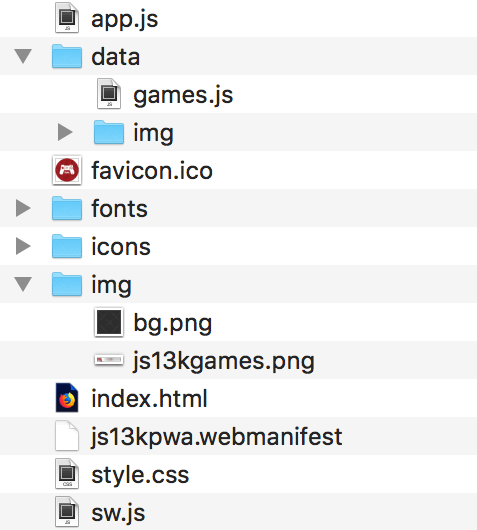
Cấu trúc website js13kPWA khá đơn giản: nó gồm một file HTML duy nhất (index.html) với CSS cơ bản (style.css), cùng một vài hình ảnh, script và font. Cấu trúc thư mục trông như sau:
Phần HTML
Xét từ góc nhìn HTML, app shell là mọi thứ nằm ngoài phần nội dung:
<!doctype html>
<html lang="vi">
  <head>
    <meta charset="utf-8" />
    <title>js13kGames A-Frame entries</title>
    <meta
      name="description"
      content="A list of A-Frame entries submitted to the js13kGames 2017 competition, used as an example for the MDN articles about Progressive Web Apps." />
    <meta name="author" content="end3r" />
    <meta name="theme-color" content="#B12A34" />
    <meta name="viewport" content="width=device-width, initial-scale=1" />
    <meta
      property="og:image"
      content="https://js13kgames.com/img/js13kgames-banner.png" />
    <link rel="icon" href="favicon.ico" />
    <link rel="stylesheet" href="style.css" />
    <link rel="manifest" href="js13kpwa.webmanifest" />
    <script src="data/games.js" defer></script>
    <script src="app.js" defer></script>
  </head>
  <body>
    <header>
      <p>
        <a class="logo" href="https://js13kgames.com">
          <img src="img/js13kgames.png" alt="js13kGames" />
        </a>
      </p>
    </header>
    <main>
      <h1>js13kGames A-Frame entries</h1>
      <p class="description">
        List of games submitted to the
        <a href="https://js13kgames.com/aframe">A-Frame category</a> in the
        <a href="https://2017.js13kgames.com">js13kGames 2017</a> competition.
        You can
        <a href="https://github.com/mdn/pwa-examples/blob/main/js13kpwa"
          >fork js13kPWA on GitHub</a
        >
        to check its source code.
      </p>
      <button id="notifications">Request dummy notifications</button>
      <section id="content">// Content inserted in here</section>
    </main>
    <footer>
      <p>
        © js13kGames 2012-2018, created and maintained by
        <a href="https://end3r.com">Andrzej Mazur</a> from
        <a href="https://enclavegames.com">Enclave Games</a>.
      </p>
    </footer>
  </body>
</html>
Phần <head> chứa một số thông tin cơ bản như tiêu đề, mô tả và liên kết tới CSS, web manifest, file JS chứa nội dung games và app.js - đó là nơi ứng dụng JavaScript của chúng ta được khởi tạo. Phần <body> được chia thành <header> (chứa hình ảnh đã liên kết), trang <main> (với tiêu đề, mô tả và chỗ dành cho nội dung), và <footer> (bản quyền và liên kết).
Nhiệm vụ duy nhất của ứng dụng là liệt kê tất cả các mục A-Frame từ cuộc thi js13kGames 2017. Như bạn thấy, đây là một website một trang rất bình thường - mục đích là có thứ gì đó đủ đơn giản để chúng ta tập trung vào phần triển khai các tính năng PWA thực sự.
Phần CSS
CSS cũng đơn giản hết mức có thể: nó dùng @font-face để tải và dùng một font tùy chỉnh, và áp dụng một số kiểu cơ bản cho các phần tử HTML. Cách tiếp cận tổng thể là để thiết kế trông đẹp trên cả thiết bị di động (theo hướng responsive web design) lẫn máy tính để bàn.
JavaScript chính của ứng dụng
File app.js làm vài việc mà chúng ta sẽ xem kỹ hơn ở các bài tiếp theo. Trước hết, nó tạo nội dung dựa trên template này:
const template = `<article>
  <img src='data/img/placeholder.png' data-src='data/img/SLUG.jpg' alt='NAME'>
  <h3>#POS. NAME</h3>
  <ul>
  <li><span>Author:</span> <strong>AUTHOR</strong></li>
  <li><span>Website:</span> <a href='http://WEBSITE/'>WEBSITE</a></li>
  <li><span>GitHub:</span> <a href='https://GITHUB'>GITHUB</a></li>
  <li><span>More:</span> <a href='http://js13kgames.com/entries/SLUG'>js13kgames.com/entries/SLUG</a></li>
  </ul>
</article>`;
let content = "";
for (const game of games) {
  const entry = template
    .replace(/POS/g, i + 1)
    .replace(/SLUG/g, game.slug)
    .replace(/NAME/g, game.name)
    .replace(/AUTHOR/g, game.author)
    .replace(/WEBSITE/g, game.website)
    .replace(/GITHUB/g, game.github)
    .replace("<a href='http:///'></a>", "-");
  content += entry;
}
document.getElementById("content").innerHTML = content;
Tiếp theo, nó đăng ký một service worker:
let swRegistration = null;

if ("serviceWorker" in navigator) {
  navigator.serviceWorker
    .register("/pwa-examples/js13kpwa/sw.js")
    .then((reg) => {
      swRegistration = reg;
    });
}
Khối code tiếp theo yêu cầu quyền thông báo khi người dùng nhấp một nút:
const button = document.getElementById("notifications");
button.addEventListener("click", () => {
  Notification.requestPermission().then((result) => {
    if (result === "granted") {
      randomNotification();
    }
  });
});
Khối cuối cùng tạo các thông báo hiển thị một mục được chọn ngẫu nhiên từ danh sách game:
function randomNotification() {
  if (!swRegistration) return;
  const randomItem = Math.floor(Math.random() * games.length);
  const notifTitle = games[randomItem].name;
  const notifBody = `Created by ${games[randomItem].author}.`;
  const notifImg = `data/img/${games[randomItem].slug}.jpg`;
  const options = {
    body: notifBody,
    icon: notifImg,
  };
  swRegistration.showNotification(notifTitle, options);
  setTimeout(randomNotification, 30000);
}
Service worker
File cuối chúng ta sẽ xem nhanh là service worker: sw.js - trước hết nó nhập dữ liệu từ file games.js:
self.importScripts("data/games.js");
Tiếp theo, nó tạo danh sách tất cả file cần cache, cả từ app shell lẫn nội dung:
const cacheName = "js13kPWA-v1";
const appShellFiles = [
  "/pwa-examples/js13kpwa/",
  "/pwa-examples/js13kpwa/index.html",
  "/pwa-examples/js13kpwa/app.js",
  "/pwa-examples/js13kpwa/style.css",
  "/pwa-examples/js13kpwa/fonts/graduate.eot",
  "/pwa-examples/js13kpwa/fonts/graduate.ttf",
  "/pwa-examples/js13kpwa/fonts/graduate.woff",
  "/pwa-examples/js13kpwa/favicon.ico",
  "/pwa-examples/js13kpwa/img/js13kgames.png",
  "/pwa-examples/js13kpwa/img/bg.png",
  "/pwa-examples/js13kpwa/icons/icon-32.png",
  "/pwa-examples/js13kpwa/icons/icon-64.png",
  "/pwa-examples/js13kpwa/icons/icon-96.png",
  "/pwa-examples/js13kpwa/icons/icon-128.png",
  "/pwa-examples/js13kpwa/icons/icon-168.png",
  "/pwa-examples/js13kpwa/icons/icon-192.png",
  "/pwa-examples/js13kpwa/icons/icon-256.png",
  "/pwa-examples/js13kpwa/icons/icon-512.png",
];
const gamesImages = [];
for (const game of games) {
  gamesImages.push(`data/img/${game.slug}.jpg`);
}
const contentToCache = appShellFiles.concat(gamesImages);
Khối tiếp theo cài đặt service worker, rồi thực sự cache toàn bộ file trong danh sách ở trên:
self.addEventListener("install", (e) => {
  console.log("[Service Worker] Install");
  e.waitUntil(
    (async () => {
      const cache = await caches.open(cacheName);
      console.log("[Service Worker] Caching all: app shell and content");
      await cache.addAll(contentToCache);
    })(),
  );
});
Cuối cùng, service worker lấy nội dung từ cache nếu có, cung cấp chức năng ngoại tuyến:
self.addEventListener("fetch", (e) => {
  e.respondWith(
    (async () => {
      const r = await caches.match(e.request);
      console.log(`[Service Worker] Fetching resource: ${e.request.url}`);