text-decoration-skip-ink
Baseline
広く利用可能
*
この機能は広く実装されており、多くのバージョンの端末やブラウザーで動作します。2022年3月以降、すべてのブラウザーで利用可能です。
* この機能の一部は、対応レベルが異なる場合があります。
text-decoration-skip-ink は CSS のプロパティで、上線や下線が文字のアセンダーやディセンダーを通過するときにどのように引くのかを指定します。
試してみましょう
text-decoration-skip-ink: auto;
text-decoration-skip-ink: none;
<section id="default-example">
  <p>
    <span class="transition-all" id="example-element">parapsychologists</span>
  </p>
</section>
p {
  font:
    1.9em "Georgia",
    serif;
  text-decoration: underline;
}
text-decoration-skip-ink は text-decoration 一括指定の一部ではありません。
構文
css
/* 単一キーワード */
text-decoration-skip-ink: none;
text-decoration-skip-ink: auto;
text-decoration-skip-ink: all;

/* グローバルキーワード */
text-decoration-skip-ink: inherit;
text-decoration-skip-ink: initial;
text-decoration-skip-ink: revert;
text-decoration-skip-ink: revert-layer;
text-decoration-skip-ink: unset;
値
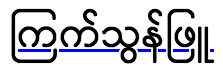
公式定義
| 初期値 | auto |
|---|---|
| 適用対象 | すべての要素 |
| 継承 | あり |
| 計算値 | 指定通り |
| アニメーションの種類 | 離散値 |
形式文法
text-decoration-skip-ink =
  auto  |
  none  |
  all
例
HTML
html
<p>You should go on a quest for a cup of coffee.</p>
<p class="no-skip-ink">Or maybe you'd prefer some tea?</p>
<p>この文は、 text-decoration-skip-ink: auto の使用例を示しています。</p>
<p class="skip-ink-all">
  この文は、 text-decoration-skip-ink: all の使用例を示しています。
</p>
CSS
css
p {
  font-size: 1.5em;
  text-decoration: underline blue;
  text-decoration-skip-ink: auto; /* this is the default anyway */
}

.no-skip-ink {
  text-decoration-skip-ink: none;
}

.skip-ink-all {
  text-decoration-skip-ink: all;
}
結果
仕様書
| 仕様書 |
|---|
| CSS Text Decoration Module Level 4 # text-decoration-skip-ink-property |