font-kerning
Baseline
Widely available
This feature is well established and works across many devices and browser versions. It’s been available across browsers since January 2020.
Thuộc tính font-kerning CSS đặt việc sử dụng thông tin kerning được lưu trữ trong font.
Try it
font-kerning: auto;
font-kerning: normal;
font-kerning: none;
<section class="default-example" id="default-example">
  <div class="transition-all" id="example-element">
    "We took Tracy to see 'THE WATERFALL' in W. Virginia."
  </div>
</section>
section {
  font-family: serif;
}
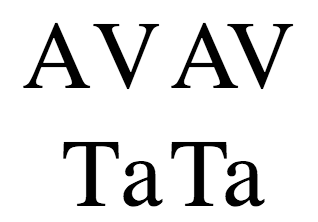
Kerning ảnh hưởng đến cách các chữ cái được sắp xếp. Trong các font có kerning tốt, tính năng này làm cho khoảng cách ký tự đồng đều và dễ đọc hơn bằng cách giảm khoảng trắng giữa một số tổ hợp ký tự nhất định.
Ví dụ trong hình dưới đây, các mẫu bên trái không dùng kerning, trong khi các mẫu bên phải có dùng:
Cú pháp
font-kerning: auto;
font-kerning: normal;
font-kerning: none;

/* Giá trị toàn cục */
font-kerning: inherit;
font-kerning: initial;
font-kerning: revert;
font-kerning: revert-layer;
font-kerning: unset;
Các giá trị
auto-
Trình duyệt xác định xem có nên dùng kerning font hay không. Ví dụ, một số trình duyệt sẽ tắt kerning trên các font nhỏ vì việc áp dụng có thể gây hại cho khả năng đọc của văn bản.
normal-
Thông tin kerning font được lưu trữ trong font phải được áp dụng.
none-
Thông tin kerning font được lưu trữ trong font bị vô hiệu hóa.
Định nghĩa hình thức
| Initial value | auto |
|---|---|
| Applies to | all elements and text. It also applies to ::first-letter and ::first-line. |
| Inherited | yes |
| Computed value | as specified |
| Animation type | discrete |
Cú pháp hình thức
font-kerning =
  auto    |
  normal  |
  none
Ví dụ
Bật và tắt kerning
HTML
<div id="kern"></div>
<div id="no-kern"></div>
<textarea id="input">AV T. ij</textarea>
CSS
div {
  font-size: 2rem;
  font-family: serif;
}

#no-kern {
  font-kerning: none;
}

#kern {
  font-kerning: normal;
}
JavaScript
const input = document.getElementById("input");
const kern = document.getElementById("kern");
const noKern = document.getElementById("no-kern");

input.addEventListener("keyup", () => {
  kern.textContent = input.value; /* Update content */
  noKern.textContent = input.value;
});

kern.textContent = input.value; /* Initialize content */
noKern.textContent = input.value;
Thông số kỹ thuật
| Thông số kỹ thuật |
|---|
| CSS Fonts Module Level 4 # font-kerning-prop |