padding-bottom
Baseline
Widely available
This feature is well established and works across many devices and browser versions. It’s been available across browsers since July 2015.
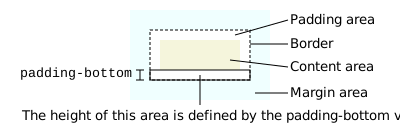
Thuộc tính CSS padding-bottom thiết lập chiều cao của vùng padding ở phía dưới của một phần tử.
Try it
padding-bottom: 1em;
padding-bottom: 10%;
padding-bottom: 20px;
padding-bottom: 1ch;
padding-bottom: 0;
<section id="default-example">
  <div class="transition-all" id="example-element">
    <div class="box">
      Far out in the uncharted backwaters of the unfashionable end of the
      western spiral arm of the Galaxy lies a small unregarded yellow sun.
    </div>
  </div>
</section>
#example-element {
  border: 10px solid #ffc129;
  overflow: hidden;
  text-align: left;
}

.box {
  border: dashed 1px;
}
Vùng padding của một phần tử là khoảng trống giữa nội dung và đường viền (border) của nó.
Note:
Thuộc tính padding có thể dùng để thiết lập padding cho cả bốn cạnh của một phần tử chỉ bằng một khai báo.
Cú pháp
/* Giá trị <length> */
padding-bottom: 0.5em;
padding-bottom: 0;
padding-bottom: 2cm;

/* Giá trị <percentage> */
padding-bottom: 10%;

/* Giá trị toàn cục */
padding-bottom: inherit;
padding-bottom: initial;
padding-bottom: revert;
padding-bottom: revert-layer;
padding-bottom: unset;
Thuộc tính padding-bottom được chỉ định bằng một giá trị duy nhất từ danh sách dưới đây. Khác với margin, giá trị âm không được phép đối với padding.
Giá trị
<length>-
Kích thước của padding dưới dạng giá trị cố định. Phải không âm.
<percentage>-
Kích thước của padding dưới dạng phần trăm, tương đối so với kích thước inline (width trong ngôn ngữ nằm ngang, được xác định bởi
writing-mode) của khối chứa. Phải không âm.
Định nghĩa hình thức
| Initial value | 0 |
|---|---|
| Applies to | all elements, except table-row-group, table-header-group, table-footer-group, table-row, table-column-group and table-column. It also applies to ::first-letter and ::first-line. |
| Inherited | no |
| Percentages | refer to the width of the containing block |
| Computed value | the percentage as specified or the absolute length |
| Animation type | a length |
Cú pháp hình thức
padding-bottom =
  <length-percentage [0,∞]>

<length-percentage> =
  <length>      |
  <percentage>
Ví dụ
Thiết lập padding dưới bằng pixel và phần trăm
.content {
  padding-bottom: 5%;
}
.side-box {
  padding-bottom: 10px;
}
Đặc tả
| Thông số kỹ thuật |
|---|
| CSS Box Model Module Level 3 # padding-physical |
Khả năng tương thích trình duyệt
Xem thêm
padding-top,padding-rightvàpadding-left- Thuộc tính viết tắt
padding padding-block-start,padding-block-end,padding-inline-startvàpadding-inline-end- Các thuộc tính viết tắt
padding-blockvàpadding-inline - Hướng dẫn Giới thiệu về mô hình hộp CSS
- Mô-đun Mô hình hộp CSS