margin-bottom
Baseline
Widely available
*
This feature is well established and works across many devices and browser versions. It’s been available across browsers since July 2015.
* Some parts of this feature may have varying levels of support.
Thuộc tính CSS margin-bottom đặt vùng lề ở phía dưới của một phần tử. Giá trị dương đặt phần tử xa các phần tử lân cận hơn, trong khi giá trị âm đặt nó gần hơn.
Try it
margin-bottom: 1em;
margin-bottom: 10%;
margin-bottom: 10px;
margin-bottom: 0;
<section id="default-example">
  <div id="container">
    <div class="row"></div>
    <div class="row transition-all" id="example-element"></div>
    <div class="row"></div>
  </div>
</section>
#container {
  width: 300px;
  height: 200px;
  display: flex;
  align-content: flex-start;
  flex-direction: column;
  justify-content: flex-start;
}

.row {
  height: 33.33%;
  display: inline-block;
  border: solid #ce7777 10px;
  background-color: #2b3a55;
  flex-shrink: 0;
}

#example-element {
  border: solid 10px #ffbf00;
  background-color: #2b3a55;
}
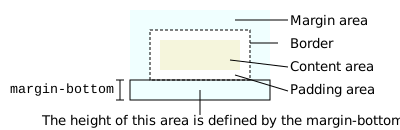
Thuộc tính này không có tác dụng đối với các phần tử inline không phải thay thế, chẳng hạn như <span> hoặc <code>.
Cú pháp
/* Giá trị <length> */
margin-bottom: 10px; /* Độ dài tuyệt đối */
margin-bottom: 1em; /* tương đối với kích thước văn bản */
margin-bottom: 5%; /* tương đối với chiều rộng của khối chứa gần nhất */
margin-bottom: anchor-size(width);
margin-bottom: calc(anchor-size(--my-anchor self-block, 20px) / 3);

/* Giá trị từ khóa */
margin-bottom: auto;

/* Giá trị toàn cục */
margin-bottom: inherit;
margin-bottom: initial;
margin-bottom: revert;
margin-bottom: revert-layer;
margin-bottom: unset;
Thuộc tính margin-bottom được chỉ định là từ khóa auto, hoặc <length>, hoặc <percentage>. Giá trị của nó có thể là dương, không hoặc âm.
Giá trị
<length>-
Kích thước lề dưới dạng giá trị cố định.
- Đối với các phần tử định vị theo neo, hàm
anchor-size()phân giải thành giá trị<length>tương đối với chiều rộng hoặc chiều cao của phần tử neo liên kết (xem Đặt lề phần tử dựa trên kích thước neo).
- Đối với các phần tử định vị theo neo, hàm
<percentage>-
Kích thước lề dưới dạng phần trăm, tương đối với kích thước inline (chiều rộng trong ngôn ngữ ngang, được xác định bởi
writing-mode) của khối chứa. auto-
Trình duyệt chọn một giá trị phù hợp để sử dụng. Xem
margin.
Định nghĩa chính thức
| Initial value | 0 |
|---|---|
| Applies to | all elements, except elements with table display types other than table-caption, table and inline-table. It also applies to ::first-letter. |
| Inherited | no |
| Percentages | refer to the width of the containing block |
| Computed value | the percentage as specified or the absolute length |
| Animation type | a length |
Cú pháp chính thức
margin-bottom =
  <length-percentage>  |
  auto                 |
  <anchor-size()>

<length-percentage> =
  <length>      |
  <percentage>

<anchor-size()> =
  anchor-size( [ <anchor-name> || <anchor-size> ]? , <length-percentage>? )

<anchor-name> =
  <dashed-ident>

<anchor-size> =
  width        |
  height       |
  block        |
  inline       |
  self-block   |
  self-inline
Ví dụ
Đặt lề dưới dương và âm
HTML
<div class="container">
  <div class="box0">Box 0</div>
  <div class="box1">Box 1</div>
  <div class="box2">Box one's negative margin pulls me up</div>
</div>
CSS
CSS cho các div để đặt margin-bottom và chiều cao
.box0 {
  margin-bottom: 1em;
  height: 3em;
}
.box1 {
  margin-bottom: -1.5em;
  height: 4em;
}
.box2 {
  border: 1px dashed black;
  border-width: 1px 0;
  margin-bottom: 2em;
}
Một số định nghĩa cho container và div để các tác dụng của lề có thể thấy rõ hơn
.container {
  background-color: orange;
  width: 320px;
  border: 1px solid black;
}
div {
  width: 320px;
  background-color: gold;
}
Kết quả
Thông số kỹ thuật
| Thông số kỹ thuật |
|---|
| CSS Box Model Module Level 3 # margin-physical |
Tương thích trình duyệt
Xem thêm
margin-top,margin-rightvàmargin-left- Thuộc tính rút gọn
margin margin-block-start,margin-block-end,margin-inline-startvàmargin-inline-end- Các thuộc tính rút gọn
margin-blockvàmargin-inline - Mô-đun CSS box model